
The number of AMA PRA Category 1 Credits™ comes from your agenda: only accredited educational time counts. The Agenda & credit tab is where you enter every session and where you see the credit computed from them.
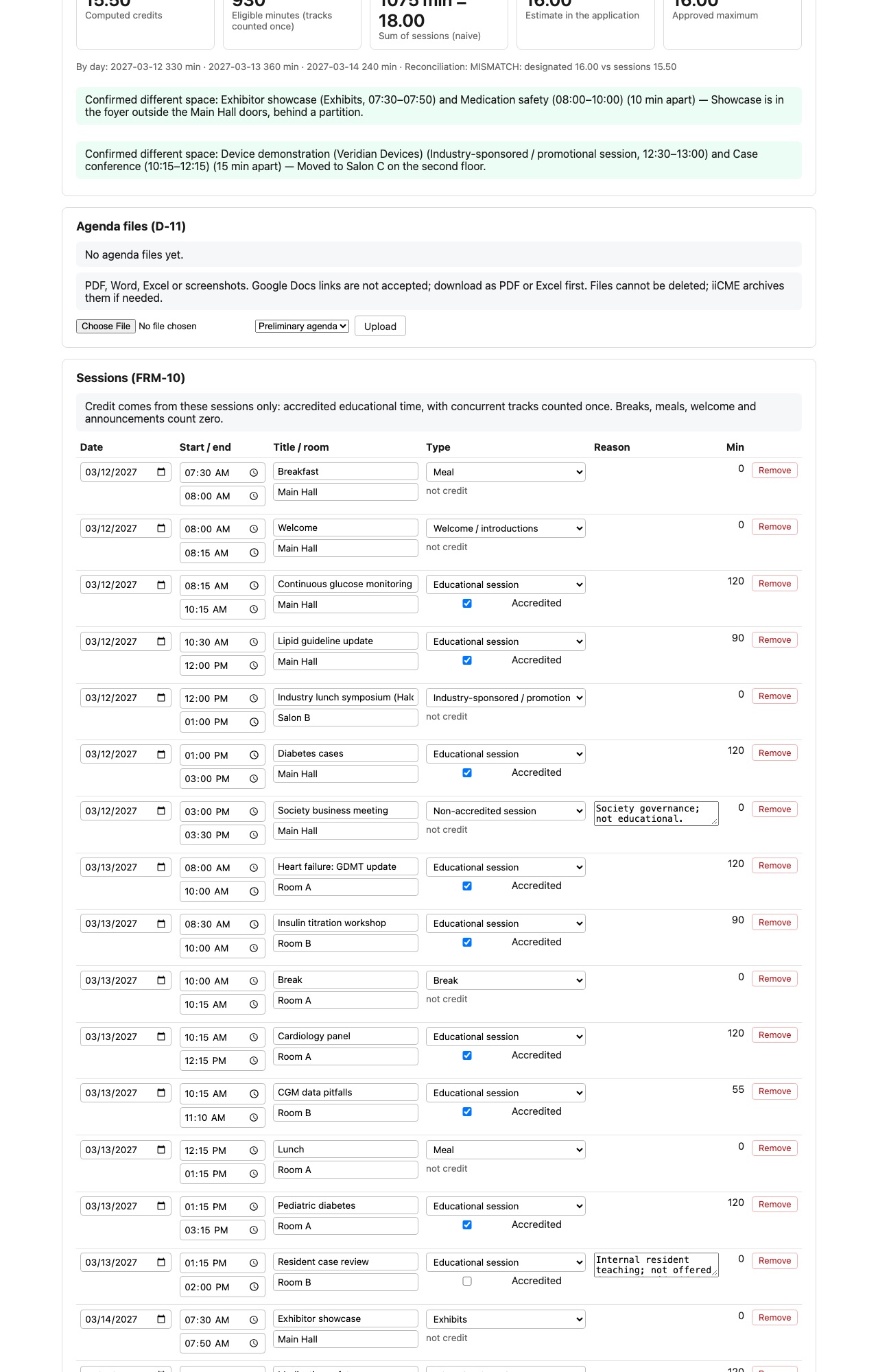
Sessions
Add one row per item on the program, including breaks and meals. For each session enter:
- Date, start time and end time
- Title and room
- Type: Educational session, Break, Meal, Welcome / introductions, Administrative announcements, Non-accredited session, Industry-sponsored / promotional session or Exhibits
- Accredited: tick for educational sessions that should earn credit
- Reason: required when an educational session is not accredited, or for a non-accredited session (for example “Internal resident teaching; not offered for credit”)
Click Add session for more rows and Save sessions when you are done.
How credit is computed
The boxes at the top show:
- Computed credits: accredited minutes ÷ 60, rounded to the nearest 0.25
- Eligible minutes: accredited time, with concurrent tracks counted once
- Sum of sessions: every session’s length added up, for comparison
- Estimate in the application and the approved maximum once iiCME approves it
Breaks, meals, welcome remarks and announcements count zero. If the computed credit differs from the estimate in your application, the page shows the difference. iiCME approves the maximum credits from the agenda, not from the estimate.
Keeping promotion separate
Industry-sponsored sessions and exhibits must be kept separate from the accredited education in time or space. If one is scheduled close to an accredited session in the same room, iiCME asks how they are separated. Confirmed separations are listed at the top, for example “Showcase is in the foyer outside the Main Hall doors.”
Agenda files
Upload your preliminary agenda, final agenda and abstracts: choose the file, choose its type and click Upload. PDF, Word, Excel or screenshots are accepted. Google Docs links are not, so download them as PDF or Excel first. Files cannot be deleted; iiCME archives them if needed.
Need help?
Send a message from the activity’s Messages tab, or email the iiCME Accreditation Team at client.support@iicme.com. For the full series, see Accreditation Portal guide: start here.
Screenshots show a fictional demonstration organization, “Lakeshore Medical Society.” Your portal shows your own organization and activities.