
After the activity, upload the final list of attendees on the Attendees tab. Attendees are added to the claim roster so that their credit claims are matched to the list.
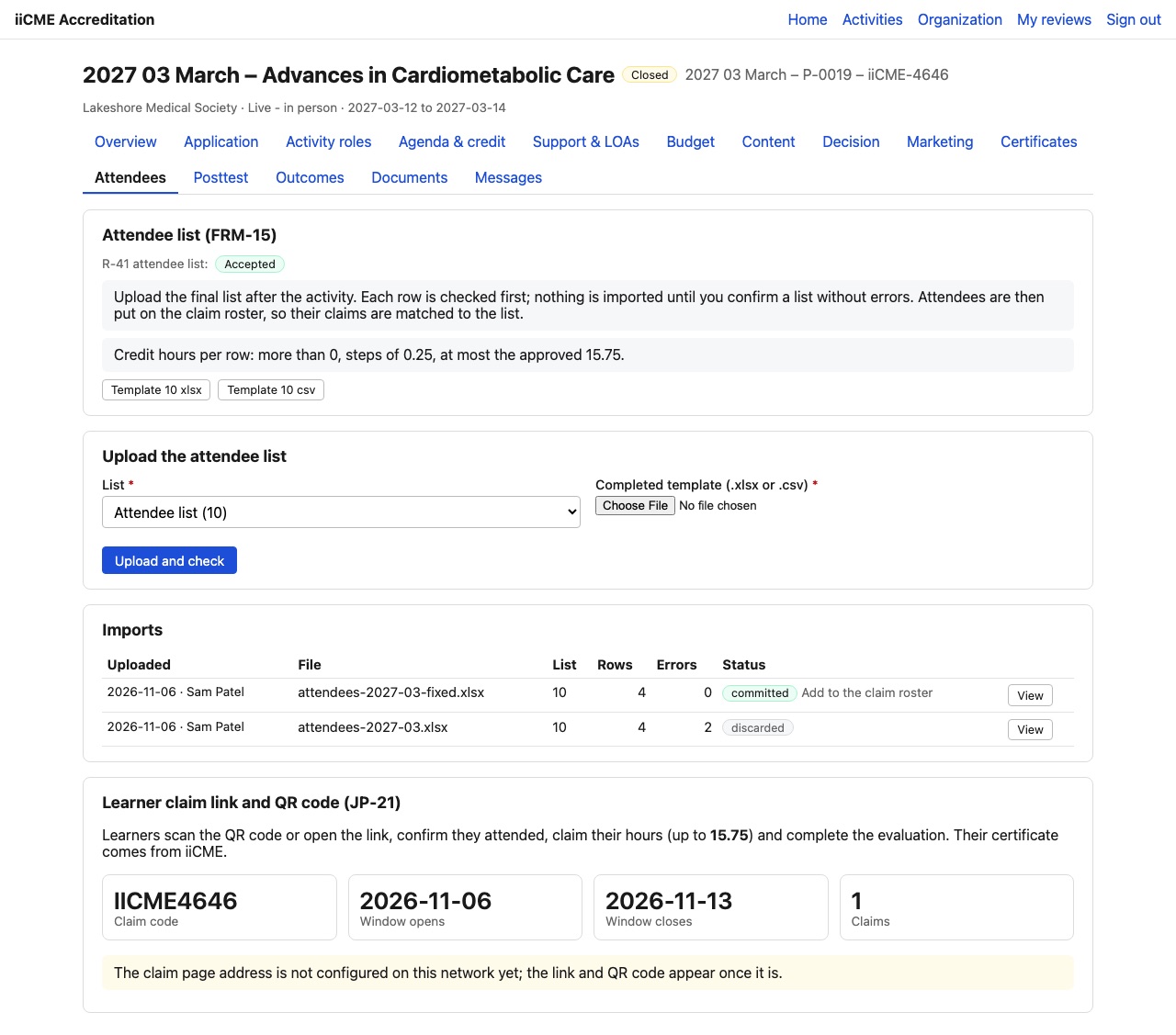
Prepare the list
- Download the template: Template 10 xlsx or Template 10 csv.
- Fill in one row per attendee. Credit hours per row must be more than 0, in steps of 0.25, and no more than the approved maximum.
Upload and check
- Choose the list type (Attendee list) and the completed file (.xlsx or .csv).
- Click Upload and check.
Each row is checked first. Nothing is imported until the list has no errors. The Imports table shows each upload with its row count and errors. Click View to see which rows need fixing, correct the file and upload it again. Lists with errors are discarded.
When a list has no errors, confirm it with Add to the claim roster. Its status becomes committed, and the checklist item for the final attendee list is updated.
Need help?
Send a message from the activity’s Messages tab, or email the iiCME Accreditation Team at client.support@iicme.com. For the full series, see Accreditation Portal guide: start here.
Screenshots show a fictional demonstration organization, “Lakeshore Medical Society.” Your portal shows your own organization and activities.