
The Budget tab is iiCME’s budget template, filled in online. You submit a preliminary budget before the accreditation decision, a final budget before launch, and a reconciliation with actual amounts after the activity.
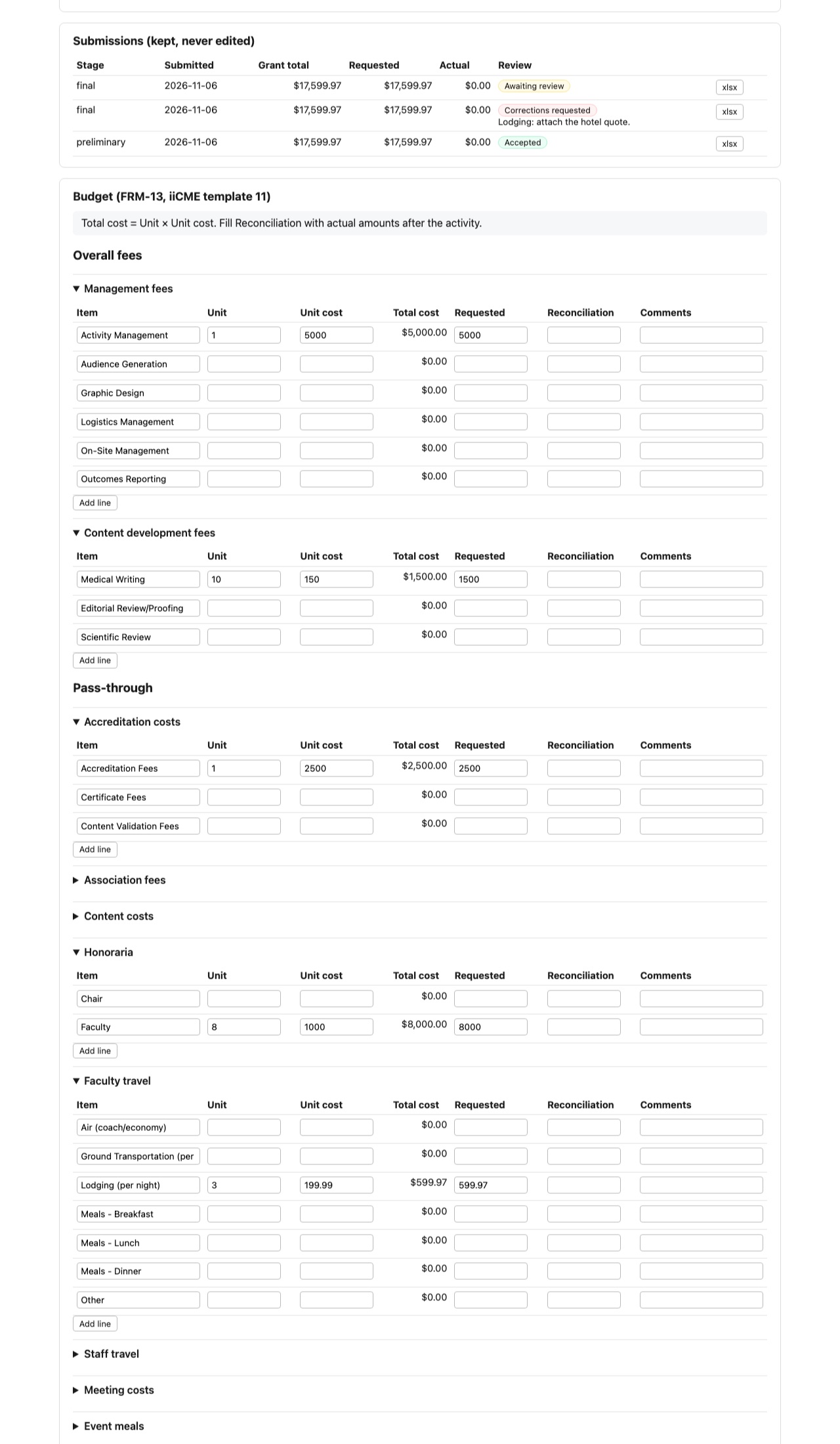
Fill in the budget
The budget is grouped into overall fees (management and content development fees), pass-through costs (accreditation and association fees, honoraria, faculty and staff travel, meeting costs, meals, enduring costs) and income (exhibitor, sponsorship and registration income). For each line enter:
- Item, Unit and Unit cost. Total cost is Unit × Unit cost and fills in automatically.
- Requested: the amount requested from grants
- Reconciliation: actual amounts, filled in after the activity
- Comments
Click Add line for more rows. The totals at the top (fees subtotal, pass-through subtotal, grant total, requested, reconciliation, and the commercial support recorded on the Support tab) update as you go.
Save and submit
- Save draft keeps your work without sending it.
- Submit preliminary, Submit final and Submit reconciliation send that version to iiCME. The reconciliation can be submitted only after the activity has ended.
- Download xlsx (draft) gives you the budget as a spreadsheet.
Submissions
Every submission is kept and never edited. The Submissions table shows each one with its review: Awaiting review, Accepted or Corrections requested with iiCME’s note (for example “Lodging: attach the hotel quote”). To make corrections, update the lines and submit again.
Need help?
Send a message from the activity’s Messages tab, or email the iiCME Accreditation Team at client.support@iicme.com. For the full series, see Accreditation Portal guide: start here.
Screenshots show a fictional demonstration organization, “Lakeshore Medical Society.” Your portal shows your own organization and activities.